

Testimonials: Client Feedback & Reviews Manager 2.2.0
A new product by XenCustomize is available: Testimonials: Client Feedback & Reviews Manager 2.2.0 - XenCustomize Testimonials allows users to submit, manage, and showcase testimonials on your XenForo forum, complete with approval, categorization, and rating features.
 User Testimonials Submission: Allow users to submit testimonials with detailed content, star ratings, and images to share their experiences, adding credibility to your community.
 User Permissions & Moderation Control: Set granular permissions per user group, including moderation controls for approving, editing, and deleting testimonials.
 Categorized Testimonials Index: Organize testimonials by categories for a clear, structured display on the index page, making it easy for visitors to browse feedback by type.
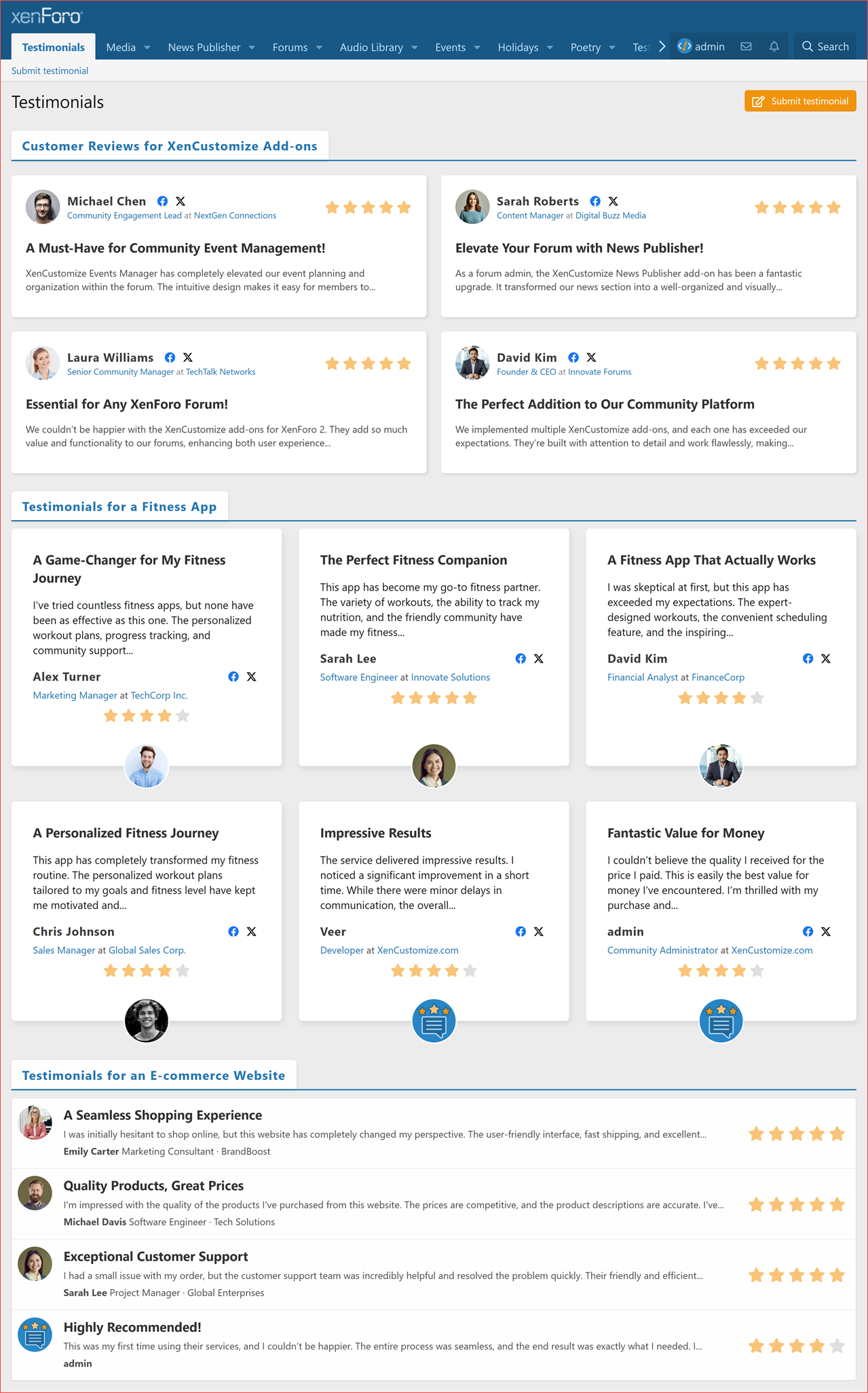
 Multiple Display Modes: Showcase testimonials in various layouts — choose from Top Aligned Grid, Bottom Aligned Grid, or Compact List to match your site’s design.
 Photo & Attachment Support: Users can attach images and files to their testimonials, providing a richer, more engaging display.
 Rating System: Built-in star rating system enables users to rate their experiences, making it easier to assess the overall sentiment of the feedback.
 Testimonial Widgets: Display testimonials in different widget positions on your forum, such as latest testimonials in a carousel or sidebar to increase visibility.
 Import Support: Easily migrate testimonials from other add-ons such as [Xenbros] Testimonial, with built-in import tools for a seamless transition.


Read more about this product...
A new product by XenCustomize is available: Testimonials: Client Feedback & Reviews Manager 2.2.0 - XenCustomize Testimonials allows users to submit, manage, and showcase testimonials on your XenForo forum, complete with approval, categorization, and rating features.
Introducing the Testimonials Add-on for XenForo 2
The XenCustomize Testimonials add-on for XenForo 2 empowers community forums to gather, manage, and showcase user testimonials with ease. Designed with flexibility and engagement in mind, this add-on offers comprehensive features like carousel sliders, user permissions, approval workflows, customizable categories, display modes, and a rich multimedia experience, including attachments, photo uploads, and a built-in rating system. With multiple display options, widget placements, and integration capabilities, the XenCustomize Testimonials add-on enhances your community’s ability to feature user feedback in a professional and engaging way.Key Features:
User Testimonials Submission: Allow users to submit testimonials with detailed content, star ratings, and images to share their experiences, adding credibility to your community. User Permissions & Moderation Control: Set granular permissions per user group, including moderation controls for approving, editing, and deleting testimonials. Categorized Testimonials Index: Organize testimonials by categories for a clear, structured display on the index page, making it easy for visitors to browse feedback by type. Multiple Display Modes: Showcase testimonials in various layouts — choose from Top Aligned Grid, Bottom Aligned Grid, or Compact List to match your site’s design. Photo & Attachment Support: Users can attach images and files to their testimonials, providing a richer, more engaging display. Rating System: Built-in star rating system enables users to rate their experiences, making it easier to assess the overall sentiment of the feedback. Testimonial Widgets: Display testimonials in different widget positions on your forum, such as latest testimonials in a carousel or sidebar to increase visibility. Import Support: Easily migrate testimonials from other add-ons such as [Xenbros] Testimonial, with built-in import tools for a seamless transition.Feature List & Screenshots (v2.2.x)
Click on each feature for detailed documentation and real-world examples (screenshots).- Categorized Testimonial Index
- Display testimonials organized by categories on the index page.
- Customize the appearance of each testimonial category using three display modes:
- Review Top Aligned Grid
- Review Bottom Aligned Grid
- Compact List
- Control the number of testimonials displayed per category on the index page.
- Complete control over which testimonial categories appear on the index page.
- Empty testimonial categories (those with no testimonials) will not be displayed on the index.
- Support for sorting categories, ensuring that changes to category display order in ACP are reflected on the index page.
- Optionally utilize multiple widget positions above and below the testimonials.
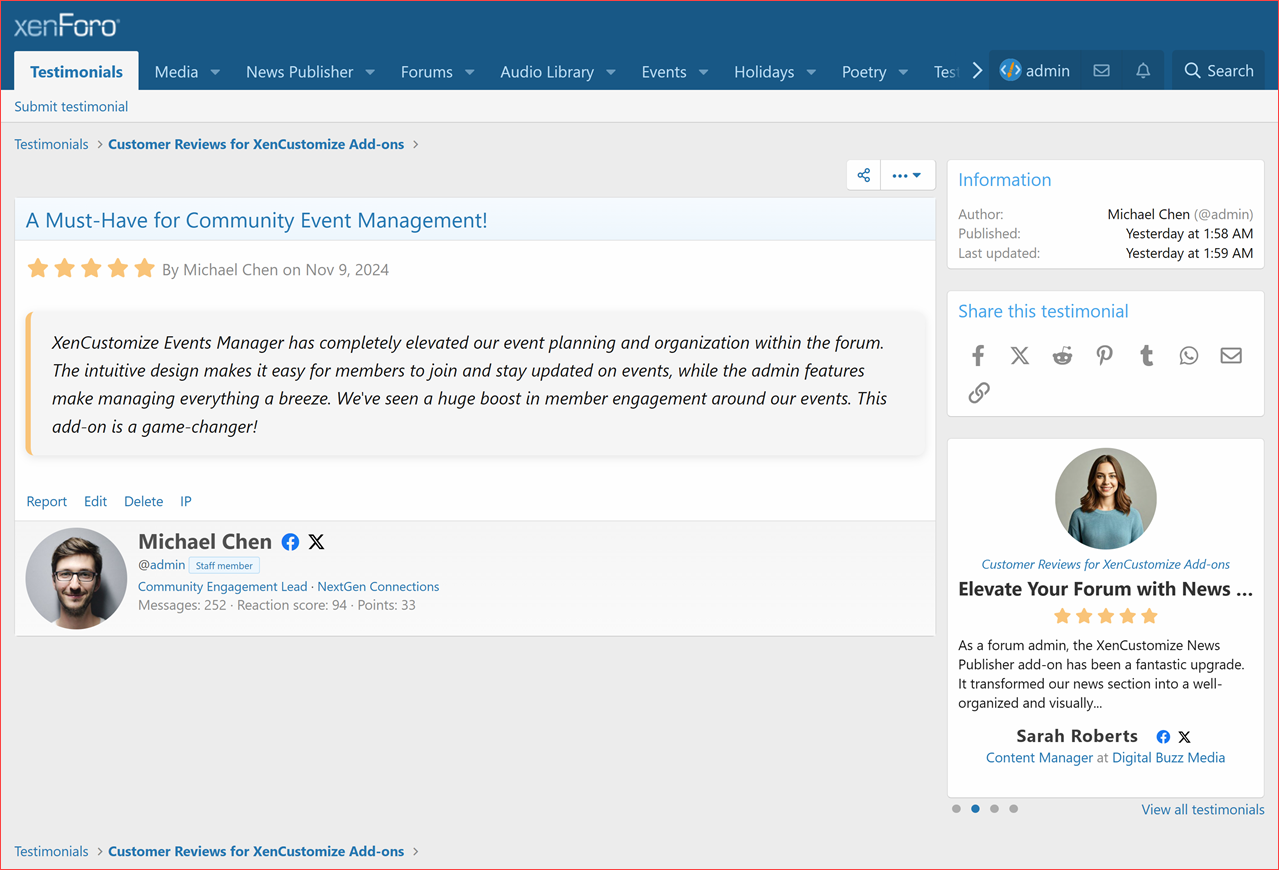
- Testimonial View
- Title
- Buttons
- Share
- More options menu
- Edit testimonial
- Edit testimonial image
- Move testimonial
- Delete testimonial
- Select for moderation
- Delete
- Undelete
- Approve
- Unapprove
- Move
- Overview tab
- Rating
- Testimonial content
- Testimonial photos gallery
- Action bar
- Reactions
- Report
- Edit
- Delete
- IP
- Author profile
- Custom testimonial image or User avatar
- Full name or User name
- Social media profile links
- Facebook profile icon and link
- X profile icon and link
- @Username and user banner
- Job title and optionally linked job website
- Company name and optionally linked to company website
- Sidebar blocks
- Information
- Author
- Publish date
- Last update date
- Widget position
- Latest testimonials widget (Carousel slider)
- Share this testimonial
- Information
- Testimonial Categories
- Add/edit category
- Title
- Description
- Parent category
- Display order
- Always moderate testimonials posted in this category
- Show category on index
- Number of testimonials
- Display mode
- Override default 'Category display mode' (Default value: Review Top Aligned Grid)
- Review Top Aligned Grid
- Review Bottom Aligned Grid
- Compact List
- Override default 'Category display mode' (Default value: Review Top Aligned Grid)
- Sort categories
- Delete category
- Add sibling or child category
- Category permissions
- Category filters
- Add/edit category
- Category Display Modes
- Testimonial Image
- Enable or disable the Testimonial Image feature in your admin options.
- Testimonial submitters can upload a large (400x400px) thumbnail.
- Testimonial image is used extensively throughout the public-facing interface of the Testimonials add-on.
- Widgets
- Latest Testimonials - Widget options includes:
- Maximum entries
- Display style
- Simple Carousel
A simple view, designed for narrow spaces such as sidebars, displaying testimonials in a carousel style slider. - Full Carousel
A full size view, displaying testimonials in a carousel style slider.
- Simple Carousel
- Category limit
All categories or your choice of selection.
- Latest Testimonials - Widget options includes:
- Widget Positions
- XenCustomize Testimonials: Index above testimonials
A position inside the main content area of the index above the testimonials. - XenCustomize Testimonials: Index below testimonials
A position inside the main content area of the index below the testimonials. - XenCustomize Testimonials: Testimonial Sidebar
Displays inside the sidebar block on the testimonial view page.
- XenCustomize Testimonials: Index above testimonials
- Importer
- Built-in importer for [Xenbors] Testimonial 1.1.0 add-on.
- Imports testimonials from [Xenbors] Testimonial 1.1.0 to [XenCustomize] Testimonials.
- User Group Permissions: Testimonials
- View testimonial
- View testimonial attachments
- React to testimonial
- Add testimonial
- Add testimonials without approval
- Upload attachments to testimonials
- Edit own testimonial
- Delete own testimonial
- User Group Permissions: Testimonials (Moderator)
- Use inline moderation on testimonials
- View deleted
- View moderated
- Approve / unapprove testimonials
- Edit any testimonial
- Delete any testimonial
- Undelete testimonials
- Hard-delete any testimonial
- Rebuild Caches
- Rebuild testimonials
- Rebuild testimonial categories
- Rebuild user testimonial counts
- Rebuild testimonial embed metadata
- Attachments
Screenshots
Testimonials index example (v2.2.0)
Testimonial view example (v2.2.0)
Widget: Full Carousel style example
Widget: Simple Carousel style example
Importer for Existing Testimonials
Yes, an importer is already included in the add-on! This allows you to seamlessly import existing testimonial data from the discontinued [Xenbros] Testimonial 1.1.0 add-on. It is built-in at no additional cost, ensuring an easy transition of your testimonials to our platform without losing any valuable data.Testimonials 2.2.x Documentations
We've posted detailed information and screenshots showcasing the full capabilities of XenCustomize Testimonials 2.2.x, so visit these threads:- Testimonials: Categorized Index
- Testimonials: Testimonial View
- Testimonials: Widget - Latest Testimonials
- Testimonials: Testimonial Categories
- Testimonials: Display Mode - Review Top Aligned Grid
- Testimonials: Display Mode - Review Bottom Aligned Grid
- Testimonials: Display Mode - Compact List
- Testimonials: Submitting or Editing a Testimonial
- Testimonials: Importer
- Testimonials: Testimonial Image
- Testimonials: Widget Positions
- Testimonials: User group Permissions - Testimonial
- Testimonials: Style Properties
- Testimonials: Rebuild Caches
Interested in Purchasing?
- Send a direct message (DM) to Veer here on XenCustomize.
- Include your website URL where you intend to use Testimonials add-on.
- We'll verify your website, which should be valid, live, and in production, and then let you complete the purchase.
Read more about this product...


