

 Exciting News:
Profile Audio Player v2 Is Here! 
Today, we're super excited to introduce you to Profile Audio Player v2.0.0! We've been working hard on this for over a month, and it's packed with awesome new features and improvements that take your music experience to the next level. 

First, let's clarify a few things. The legacy version, v1, won't receive any new feature updates as we move forward with v2. However, we're still committed to maintaining it when needed. Since the database structure is entirely different in v2, the upgrade won't be simple. That's why we've included the data migration script as part of the upgrade process, and it will take care of your existing data.
 [Read the changelog carefully]
In v2, we pretty much built everything again from the ground up, except for how the player looks. Why did we do this? Well, v1 was made thinking that most people would only need about 10 audio tracks on their profile. It was simple and easy to use. But as time went on, people wanted more features, and v1 couldn't handle them all. So, we had to start fresh and make something even better.


Now, about the price. v2 is much bigger and more complex than v1, it comes with an entirely new structure and solid codebase, making room for future development. So we've had to increase the cost. It's now $45. If you already have v1, you can upgrade to v2 for an extra $20. If you want to remove our branding or renew your license, that will be $20 separately. We hope you understand why we had to do this, and we really appreciate your support.

Alright, let's get into the details of what's new in v2.
Changelog
Complete code rewrite from scratch
- Introduced an entirely new database structure.
- Upgrade/migrate Script from v1.0.3 to v2:
- Before proceeding with the upgrade, make sure your current Profile Audio Player installation is running v1.0.3.
- Includes the script to migrate existing data to new table.
- Removes the old table as part of the upgrade process.
- Streamlined the upgrade/migration process, making it as simple as a single click.
 Adding New Profile Audio
- Introduced a completely new interface for adding profile audio entries.
- Users now have the flexibility to create an unlimited number of new profile audio entries. (Permission Controlled)
- Implemented permission checks to ensure users have the necessary rights to add profile audio.
- Added support for uploading audio attachments for profile audio entries.
- Implemented checks for the maximum allowed file size for audio attachments.
- Displays an error message when no audio file or external audio URL is provided.
- Enforced checks to determine if the maximum audio count limit for the user has been reached, and if so, displays an error message.
- Checks the permission if the user can upload audio attachment.
- Enabled users to input details for the profile audio, including title, artist, album, genre, release year, and more.
- Users can now include lyrics in their profile audio entries.
- Introduced the option for users to add external links as buttons to services such as Spotify, Apple Music, SoundCloud, and YouTube Music.
- Users can also embed external services like Spotify, Apple Music, SoundCloud, and YouTube Music.
- Enhanced the profile audio saving process, which includes validation checks and redirects to the brand new 'Audio View' route after successfully saving the entry.
View attachment 291719
View attachment 291720
 Profile Audio Editing
- Users have the ability to edit their existing profile audio entries.
- Permission checks are performed to determine if users have the necessary rights to edit profile audio entries.
- Users can make edits to various details of the profile audio, including title, artist, album, genre, release year, and more.
- Users can also edit external links that lead to services such as Spotify, Apple Music, SoundCloud, and YouTube Music.
- Validates user input and saves the edited profile audio entity.
- Separate link for uploading and deleting audio attachment for profile audio (overwriting existing file).
- Separate link for uploading and deleting album art for profile audio (overwriting existing image).
 Audio Attachment Support
- Users can attach audio files to their profile audio entries, supporting various audio formats.
- Compatibility is checked based on the file extension.
- Removed the legacy v1 audio upload functionality and introduced a new method following the standard used by official XF add-ons.
- Added temporary support for previously uploaded v1 audios as a fallback option for new audio attachments.
- Introduced a method to generate attachment URLs with cache control.
 Album Art Upload Support
- Removed the legacy v1 album art upload functionality and replaced it with an all-new method following the standard used by official XF add-ons.
- Added temporary support for previously uploaded v1 album art images as a fallback to new album art.
- Implemented the generation of album art paths and URLs with cache control parameters.
 Profile Audio Viewing
- Users can now view their own profile audio tracks as well as those of other users.
- Introduced a familiar user interface with convenient navigation through tabs, breadcrumb, and sidebar widgets.
- Users can easily view and edit profile audio details, including audio, title, artist, lyrics, album, album art, genre, release year, and more.
- Introducing a sleek Minimelody player with album art, title, artist, play/pause, repeat, and volume controls for an enhanced audio experience.
- Users with permission can play and listen audio track right on the view page.
- Users with permission can download the audio track right from the view page.
- Display of plays count as each and every play of profile audio is now logged and tracked.
- Link buttons for various music streaming services (Spotify, Apple Music, SoundCloud, YouTube Music).
- Embedded media tabs for various music streaming services (Spotify, Apple Music, SoundCloud, YouTube Music).
- Users can react as we added reaction support for profile audio.
- Users can share audio as we enhanced sharing options for the audio.
- Users can report an audio as we added functionality to report profile audio.
- Tools menu that quickly Edit details, Edit album art, Edit audio attachment, Reassign, Delete and view moderator actions.
- Audio information block in sidebar displaying username, add date, last update date, plays count.
- Share this Audio block in the sidebar.
- Latest audio tracks widget in the sidebar.
- Widget position in sidebar.
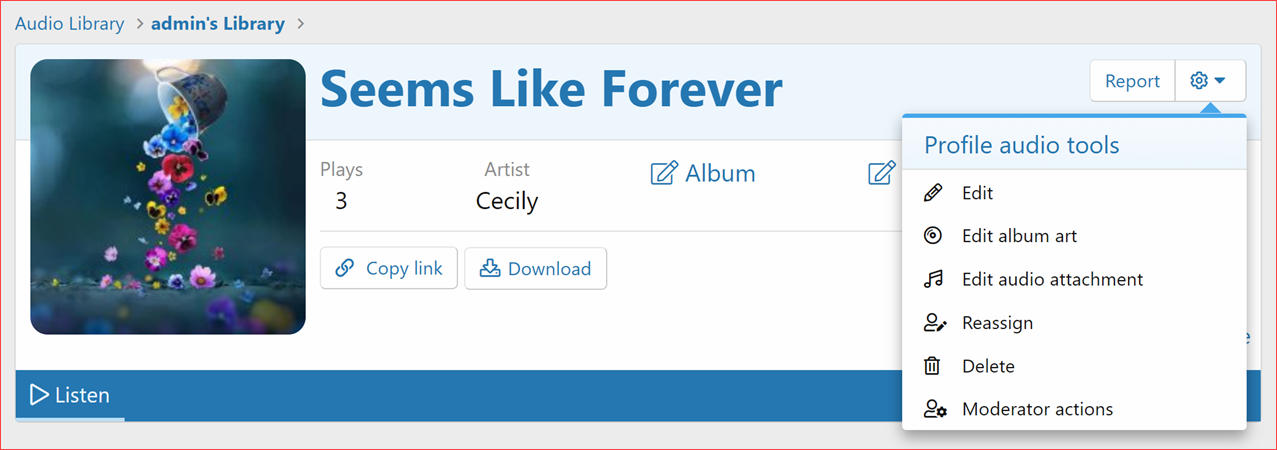
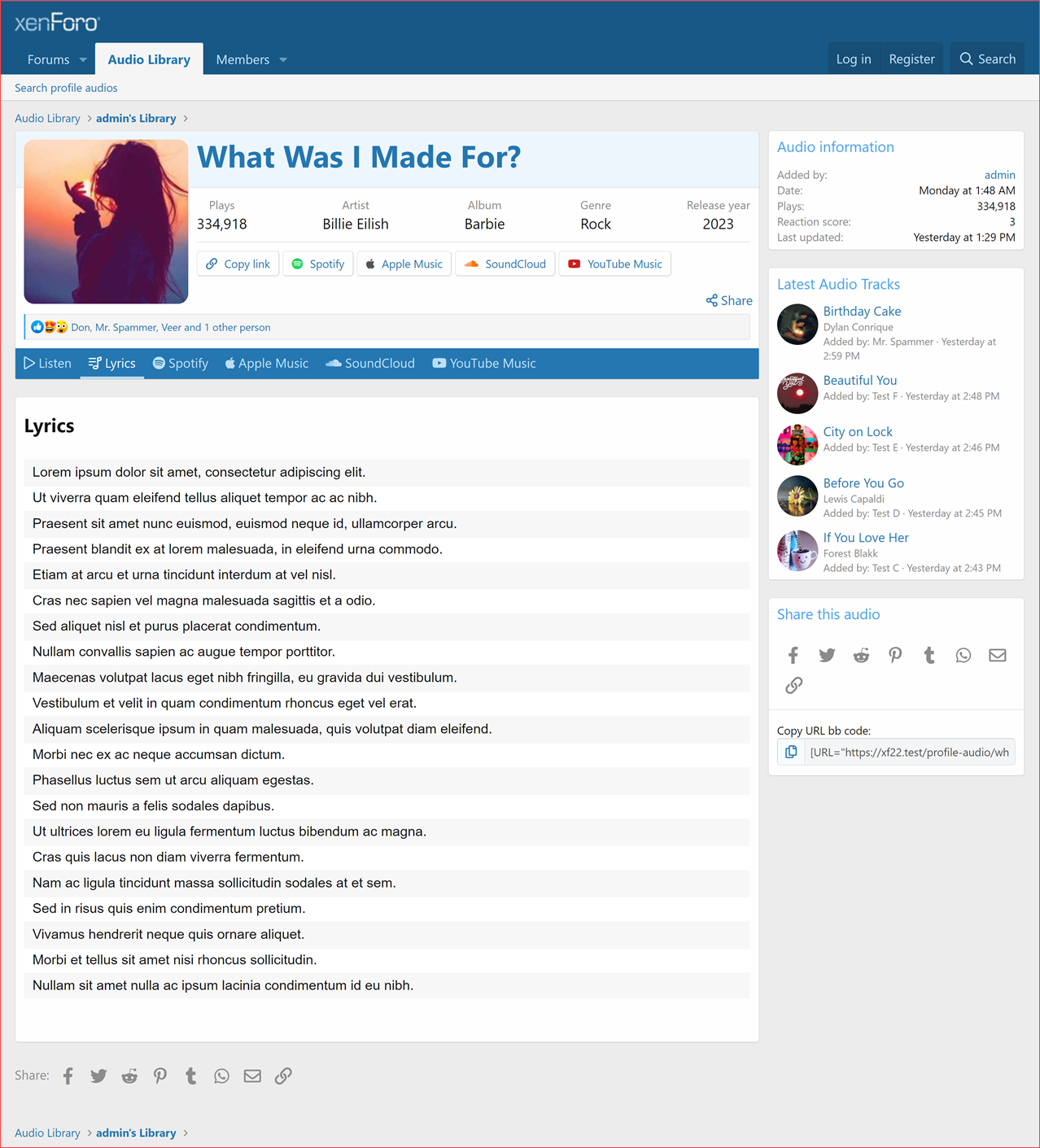
 Minimelody Player
- Introducing the sleek Minimelody player, purpose-built for audio view pages.
- Support album art, audio title, artist, play/pause, repeat, and volume controls for an enhanced audio experience.
- Play counts are tracked and recorded whether you're playing or repeating your favorite track.
 Plays Count:
- Every time an audio track is played on profiles or within the Minimelody player on the audio view page, the system will accurately track and record the play count.
- This includes the ability to track and record every single play without requiring a page reload.
- For those who enjoy repeated listening, each replay will also be counted separately, accurately reflecting the true number of times the audio has been played.
 Reactions
- Included support for reactions on profile audio.
- Users will receive alerts when someone reacts to their profile audio.
 Report
- Added support for reporting a profile audio.
Profile Audio Library Index
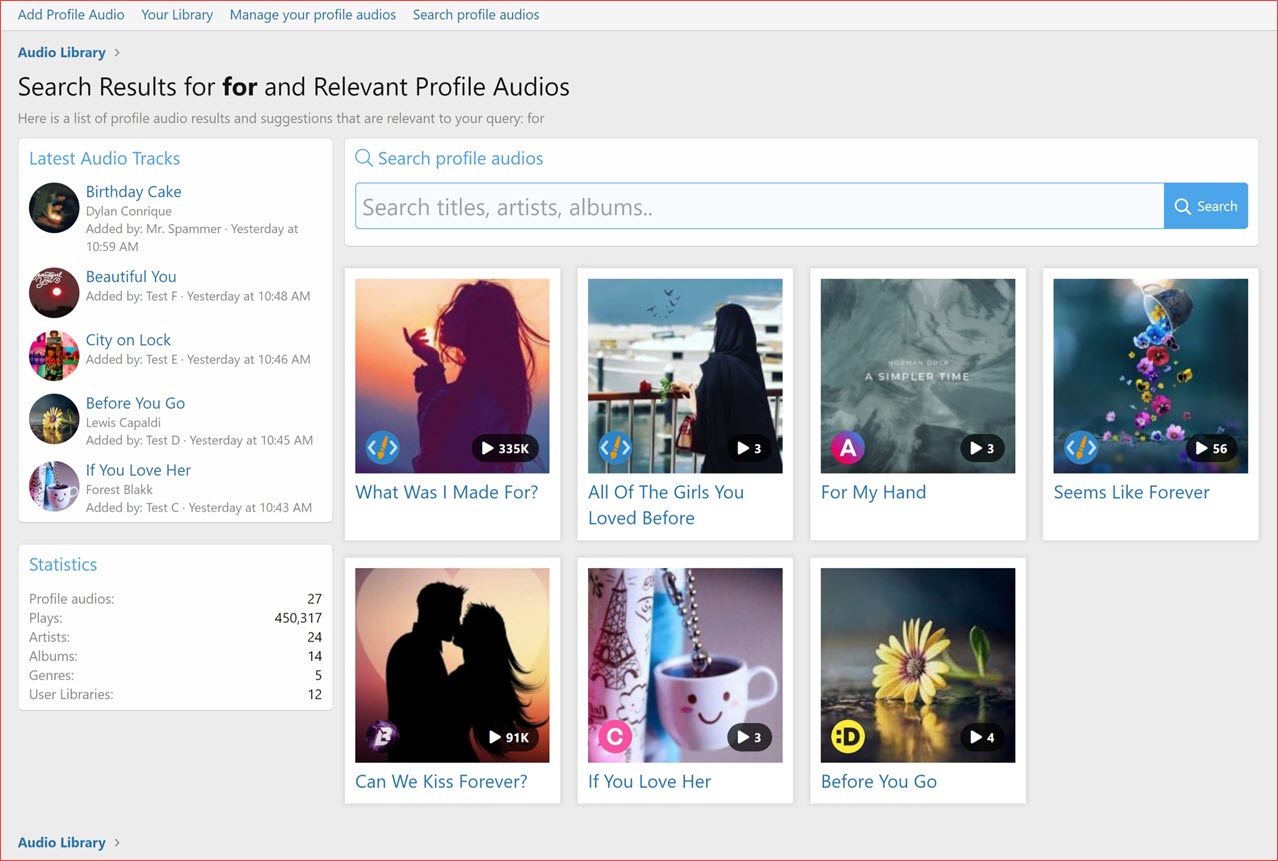
Discover a new audio library section, showcasing audio collections with a clean grid layout and advanced search options.- Introduced brand new audio library section showcased all users' collections in a grid layout, ensured a clean and organized design to improve user experience.
- AJAX Search Box at the top that support autocomplete allows users to search for audio titles, artist and albums.
- Users' audio libraries (collections) are showcased in a grid layout.
- Each user library item includes the user's avatar and the count of audio tracks it contains.
- Improved page navigation with a pagination feature to browse through audio libraries.
- Implemented a new grid layout to showcase audio tracks.
- Audio tracks are displayed using widgets with different order options: Create date, Recent update, Most popular (based on plays count), Highly rated (based on user reactions), and random selection.
- For administrators, there is additional guidance and information provided.
- Added a latest audio tracks widget in the sidenav.
- Added a statistics block in the sidenav.
- Provides statistics such as Total Profile audios, total plays, artists, albums, genres, and user libraries count.
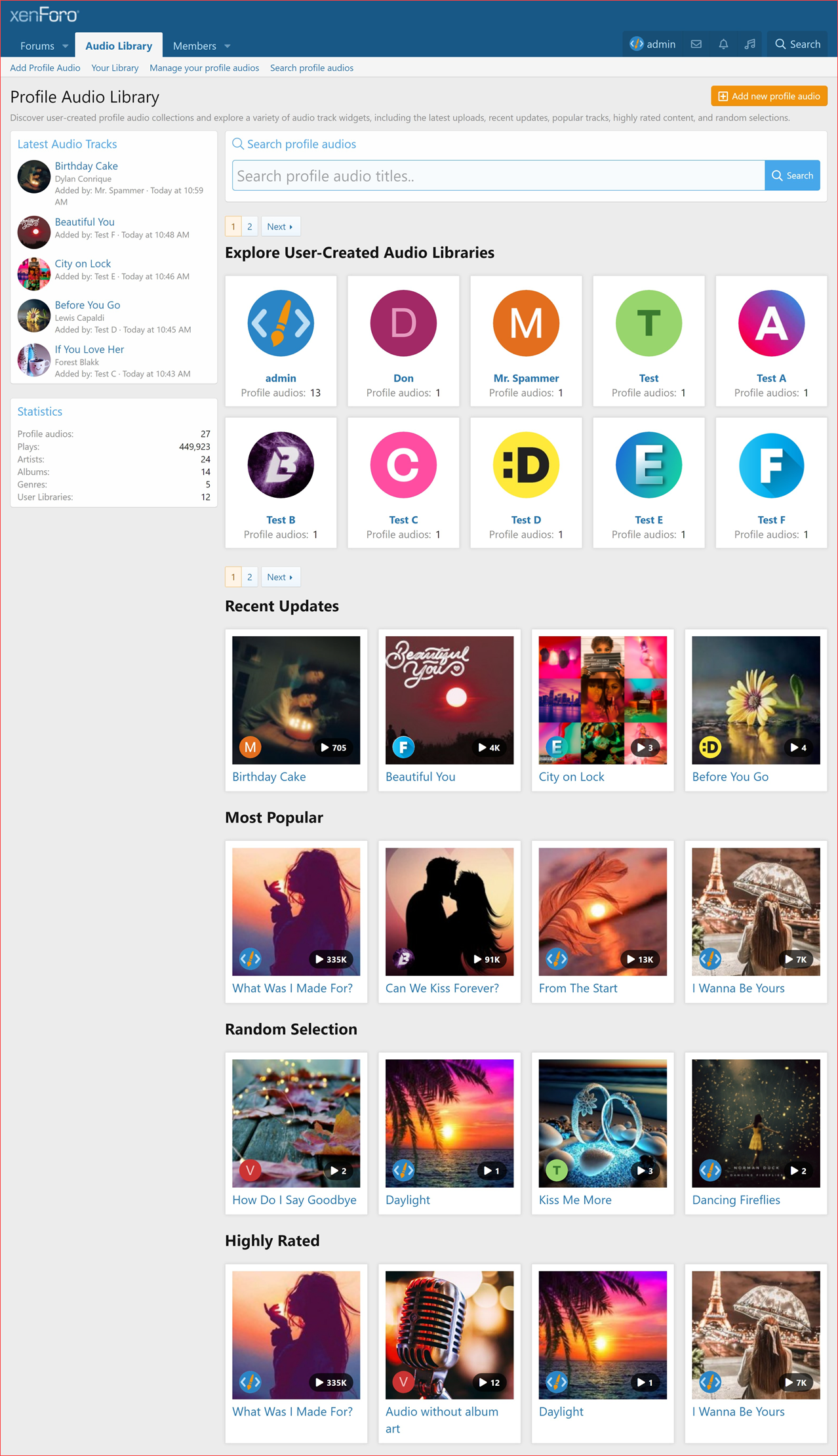
Profile Audio Library View
Upon adding their first profile audio, a user's audio library is created, showcasing their profile audio content in a grid format.- The page title dynamically adapts based on the user. If the user viewing the Library is the same as the owner, it displays "Your Profile Audio Library." If the viewer is someone else, it displays "Profile Audio Library by [Username]."
- Profile audios are presented in a grid layout within the library view, each featuring title, album art, play count (if available), and user avatar.
- Fallback handling is implemented for cases without album art:
- It displays a legacy album art image (from v1) when no album art attachment is found.
- A default album art image is shown when there's neither an attachment nor a legacy image.
- Pagination is added for easy navigation through multiple library pages.
- Informative messages are provided when a user has no profile audios, with distinct messages for the profile owner and other viewers.
- Included a sidenav widget position for customizing the side navigation.
- Added a latest audio tracks widget in the sidenav.
- Added a statistics widget in the sidenav.
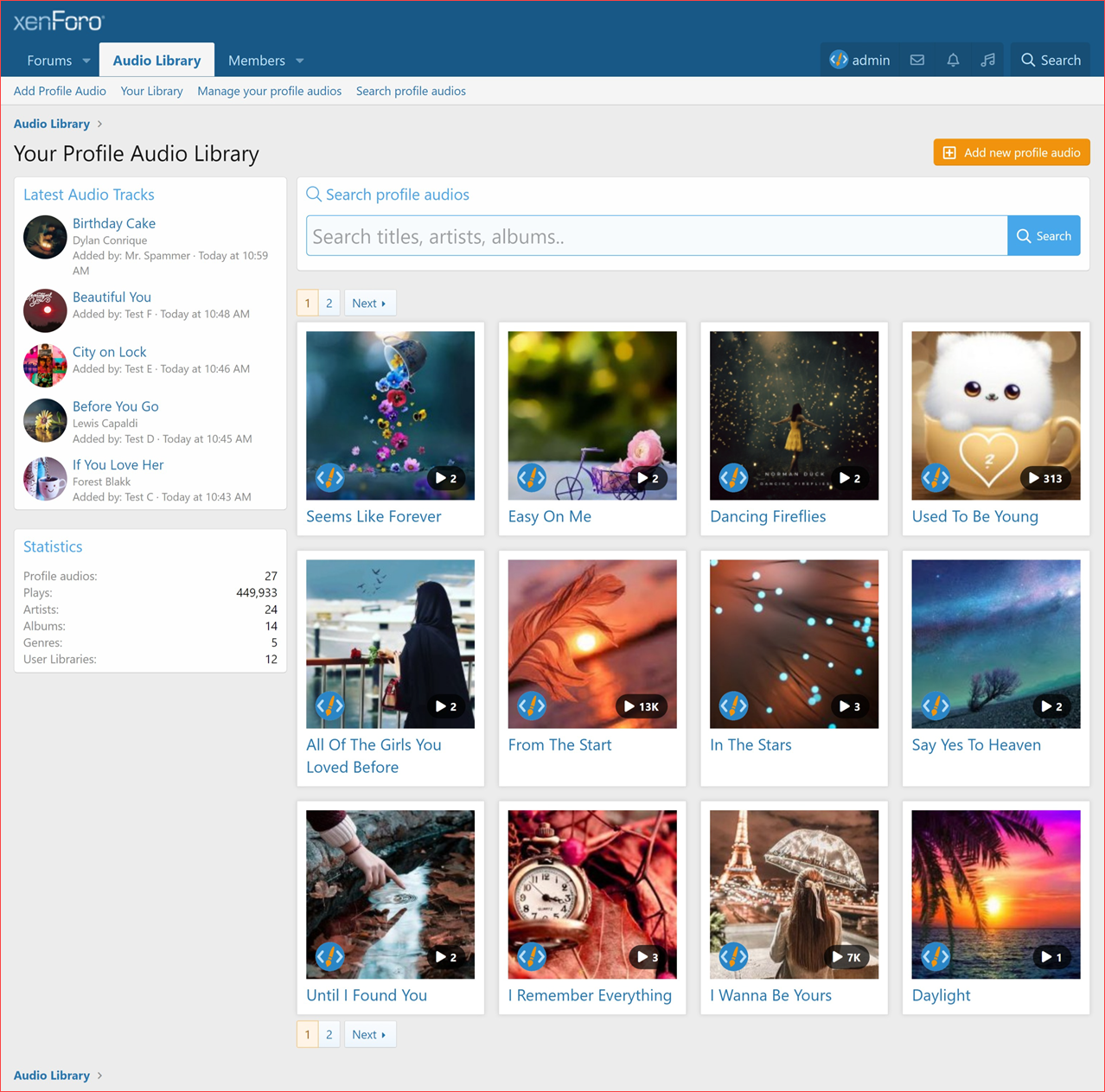
 Quick Search (Autocomplete)
- Introduced a brand new quick search box with autocomplete, visible on Library index and view pages.
- Users can search within the audio titles, artists, and albums.
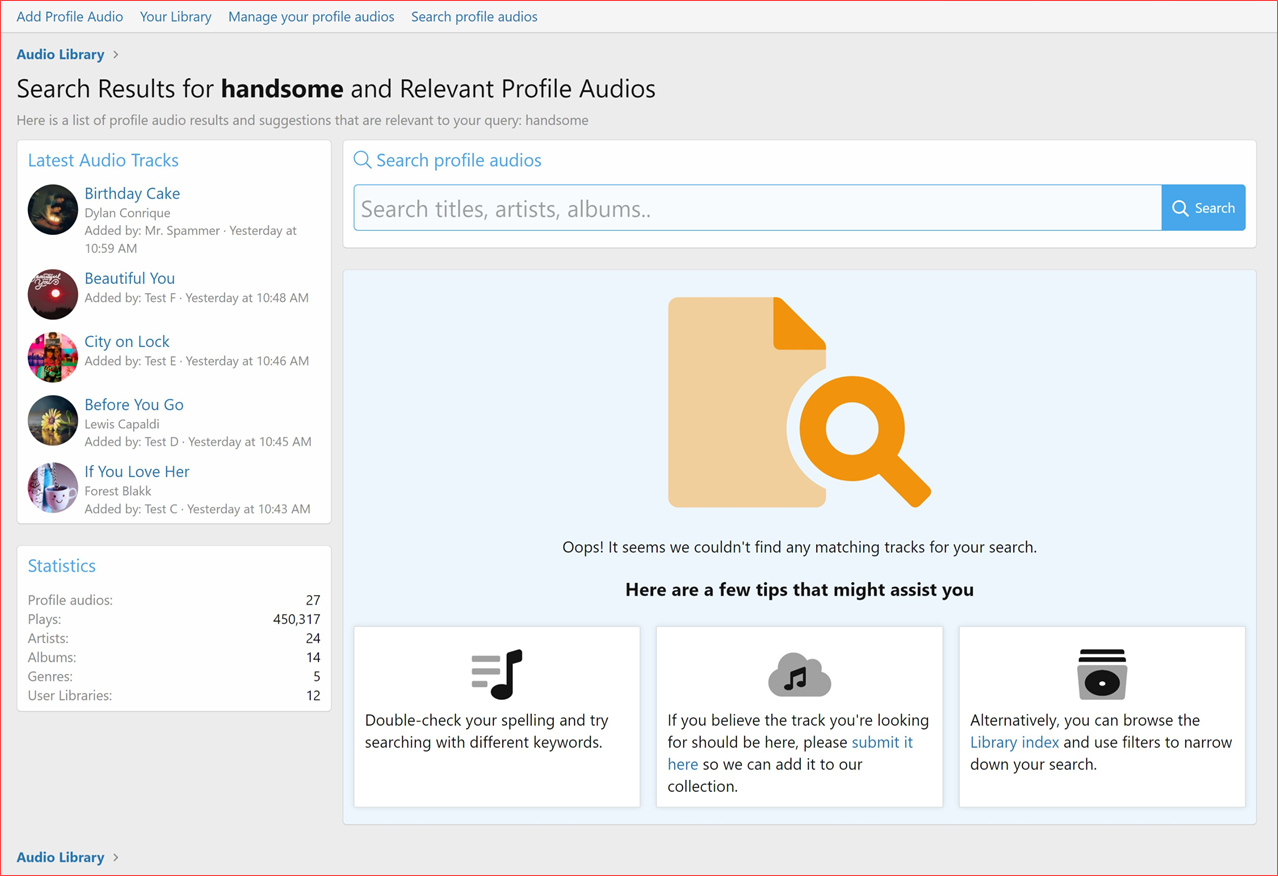
- If a single audio track is found, it redirects to its page; otherwise, it displays matched results on the search results page.
- Search results page maintains the same grid layout with pagination support.
- Included a sidenav widget position on the search results page.
- You'll find latest audio tracks widget in the sidenav.
- Added a statistics widget in the sidenav.
 Search Indexing
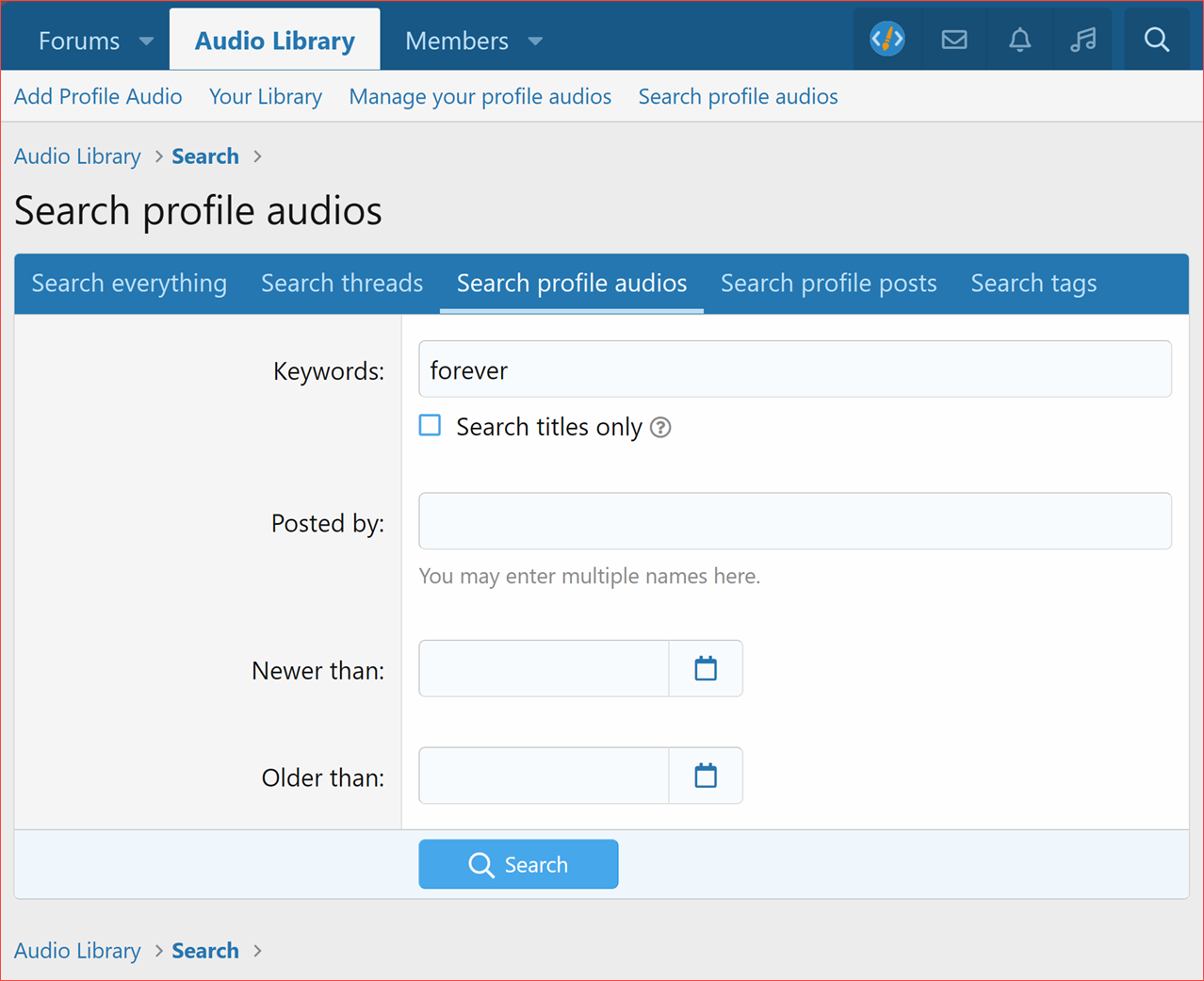
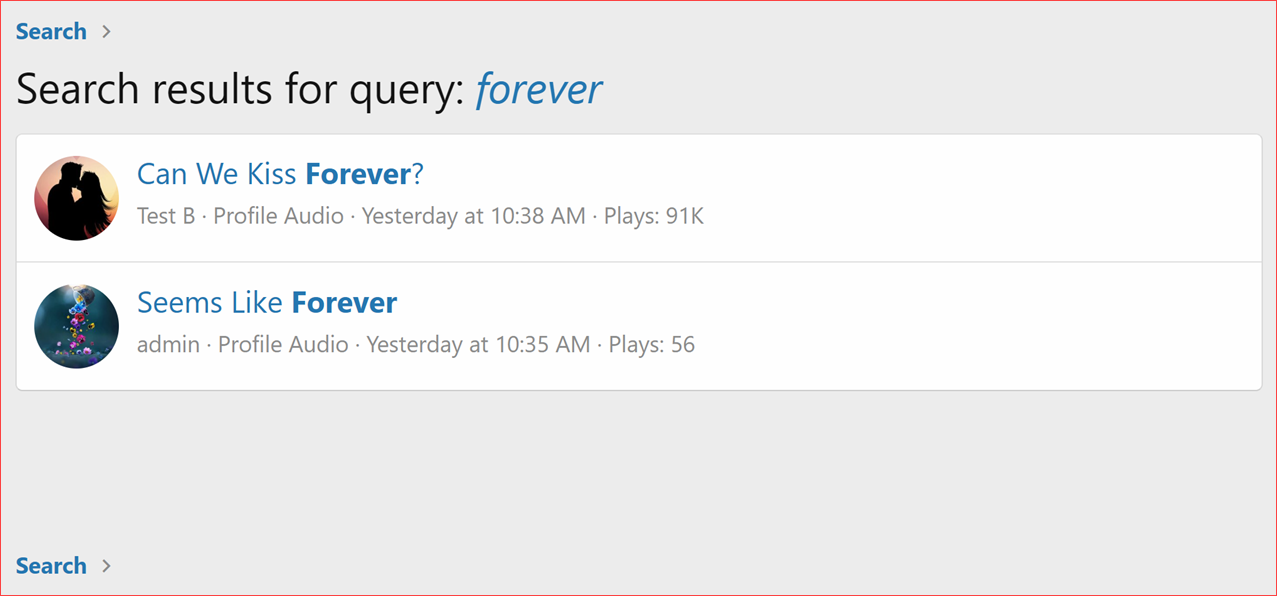
- Added support for search indexing for the Profile audio content type.
- Rebuild the search index using the Rebuild Caches in Admin CP.
 Manage Your Profile Audios
- Legacy "Manage Your Playlist" page replaced with all-new "Manage Your Profile Audios".
- Displays complete list of profile audios added by the user.
- Each profile audio entry displays:
- Title with a link to the audio view (quick view in an overlay).
- Artist name, if available.
- Album name, if available.
- Album art image, if available. If no album art is available for an audio, a default album art is displayed.
- Album art tooltip for additional information.
- Number of plays the audio has received.
- Lyrics, if available, the audio entry displays a snippet of the lyrics.
- Creation date.
- Last edit date (if edited).
- Options menu for managing audio actions.
- Users can perform various actions on their profile audios, including:
- Copying the profile audio link to the clipboard.
- Downloading the audio file (if permitted).
- Editing details such as title, artist, album, release year, lyrics and more.
- Editing album art.
- Editing audio attachment.
- Reassigning ownership of the profile audio.
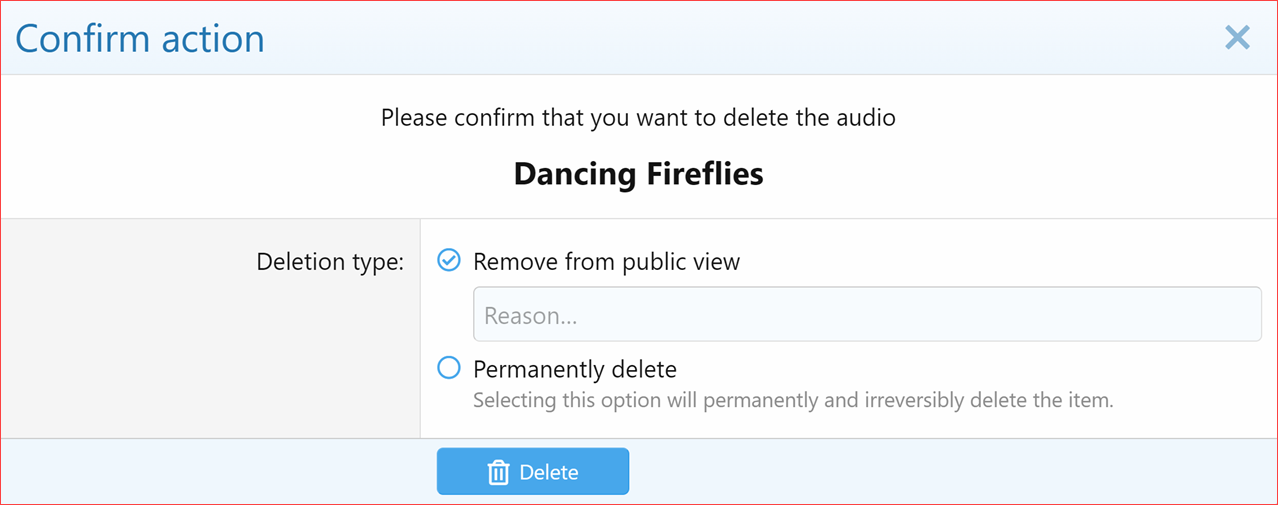
- Deleting the profile audio.
- Pagination:
- Users can navigate through their profile audios using pagination.
- The number of profile audios displayed per page is customizable via Admin option (Profile audios per page).
- Empty Section Handling:
- If the user has not added anything yet, a message prompts the user (with link) to add their first profile audio.
User Profile Audio Count
- Added the counter to display the user's profile audio count in the member stats and various other locations.
- Implemented the method to recalculate and rebuild counters as needed.
- Made adjustments to the user's profile audio count when reassigning profile audio.
Find All Profile Audios by User
- Added the find all profile audios by user link to the find content dropdown on user profiles.
 New Usergroup Permissions
- Max audios per user
- Can download audio
- Can edit own audio
- Can delete own audio
- Can edit any audio
- Can delete any audio
- Can reassign audio
 Fine-grained permission control
Enhanced permission checks for various actions:- Viewing the profile audio player.
- Adding new profile audio.
- Editing profile audio entries.
- Editing attachments.
- Editing album art.
- Sending moderator action alerts.
- Reacting to profile audio entries.
- Reporting profile audio entries.
- Reassigning profile audio entries.
- Deleting profile audio entries (soft and hard deletes).
- Undeleting profile audio entries.
- Downloading audio files.
- Viewing moderator logs.

 Admin Options
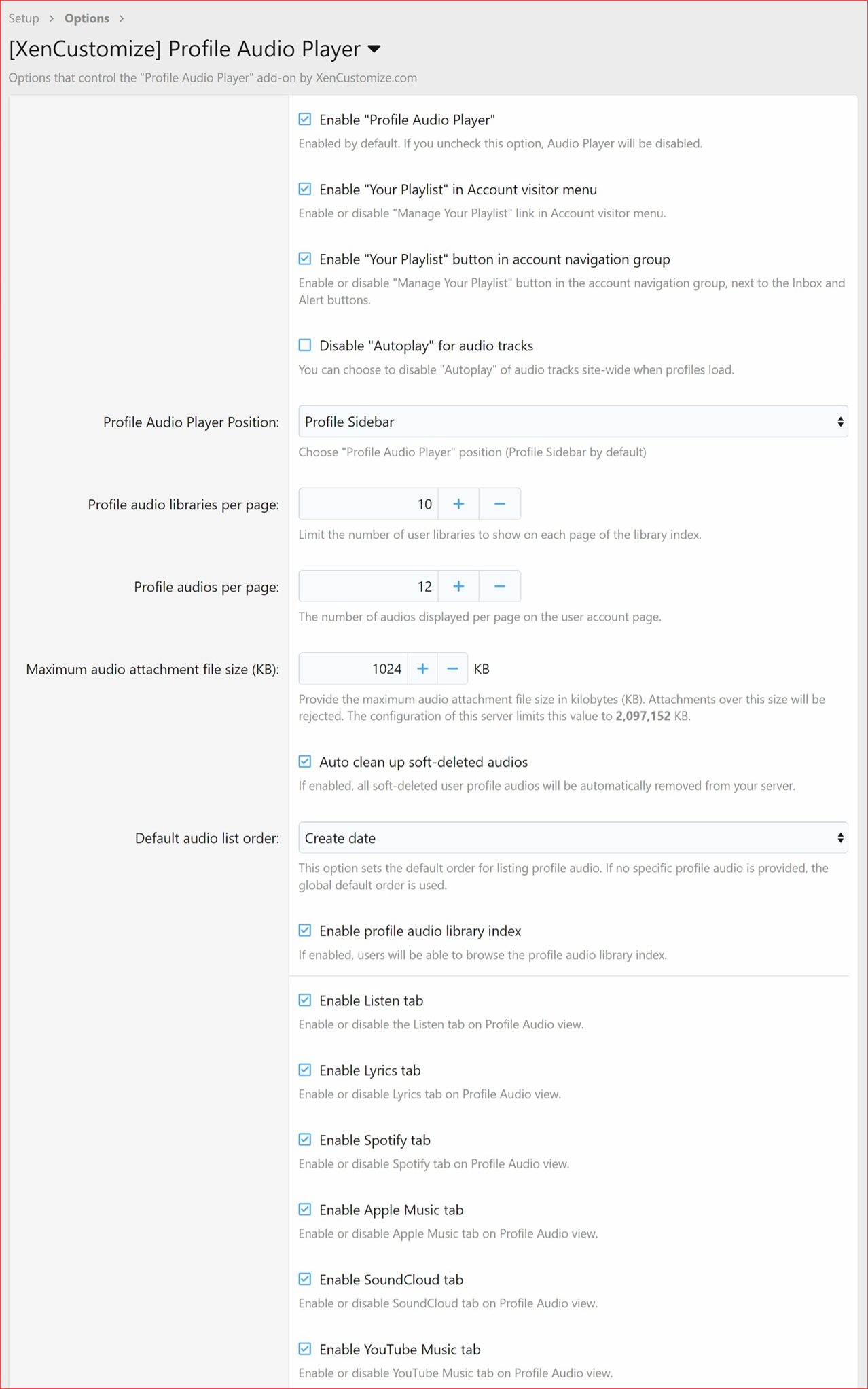
The following new options have been added:- Profile audios per page
- Profile audio libraries per page
- Maximum audio attachment file size (KB)
- Default audio list order
- Auto clean up soft-deleted audios
- Enable profile audio library index
- Enable Listen tab
- Enable Lyrics tab
- Enable Spotify tab
- Enable Apple Music tab
- Enable SoundCloud tab
- Enable YouTube Music tab
 New Style Property Group "Profile Audio View"
- Profile audio header.
- The profile audio view page's content header is styled with these settings.
- Profile audio header - Title.
- The styling of the title on profile audio view page is controlled here.
- Profile audio search button.
- Profile audio search textbox.
- Profile audio lyrics text stripes.
- Profile audio lyrics text stripes default.To-do:
- New Style Property Group: Profile Audio Library Index
- New Style Property Group: Profile Audio Library View
 Widgets
- Profile Audio Tracks Widget:
- Displays profile audio tracks effortlessly. Custom sorting options. Stylish and visually appealing display.
- Profile Audio Statistics
- Provides insights with various profile audio statistics. Includes data on audios, plays, artists, albums, libraries.
 Widget Positions
- Profile Audio Library Index: Above Content.
- Profile Audio Library Index: Below Content.
- Profile Audio Library Index: Sidenav.
- Profile Audio Library View: Above Content.
- Profile Audio Library View: Below Content.
- Profile Audio Library View: Sidenav.
- Profile Audio View: Sidebar.
 Cron Entries
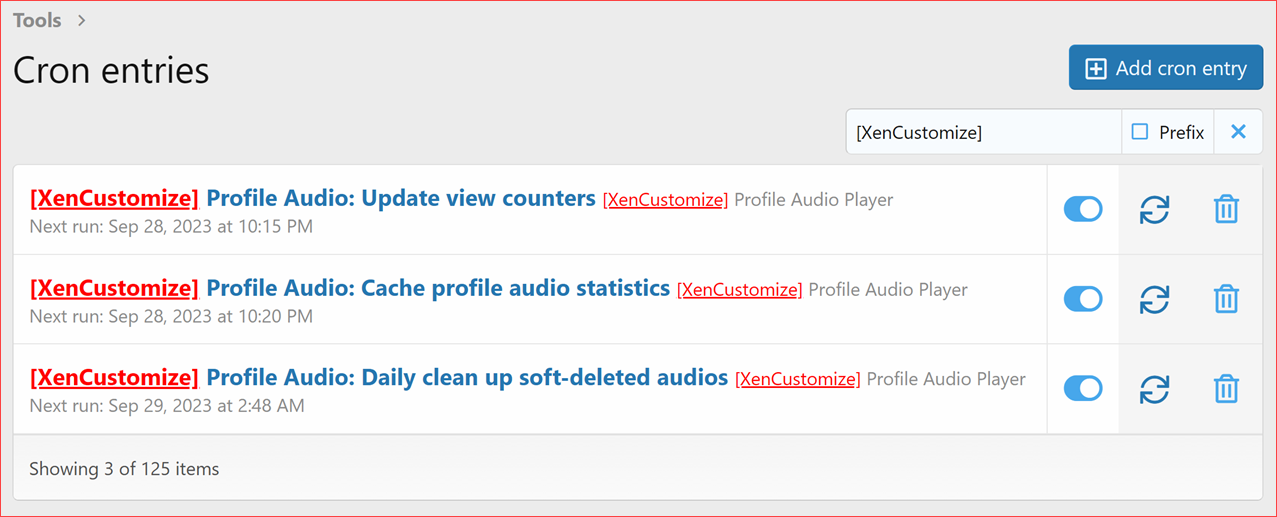
- Profile Audio: Update view counters.
- Profile Audio: Cache profile audio statistics.
- Profile Audio: Daily clean up soft-deleted audios.
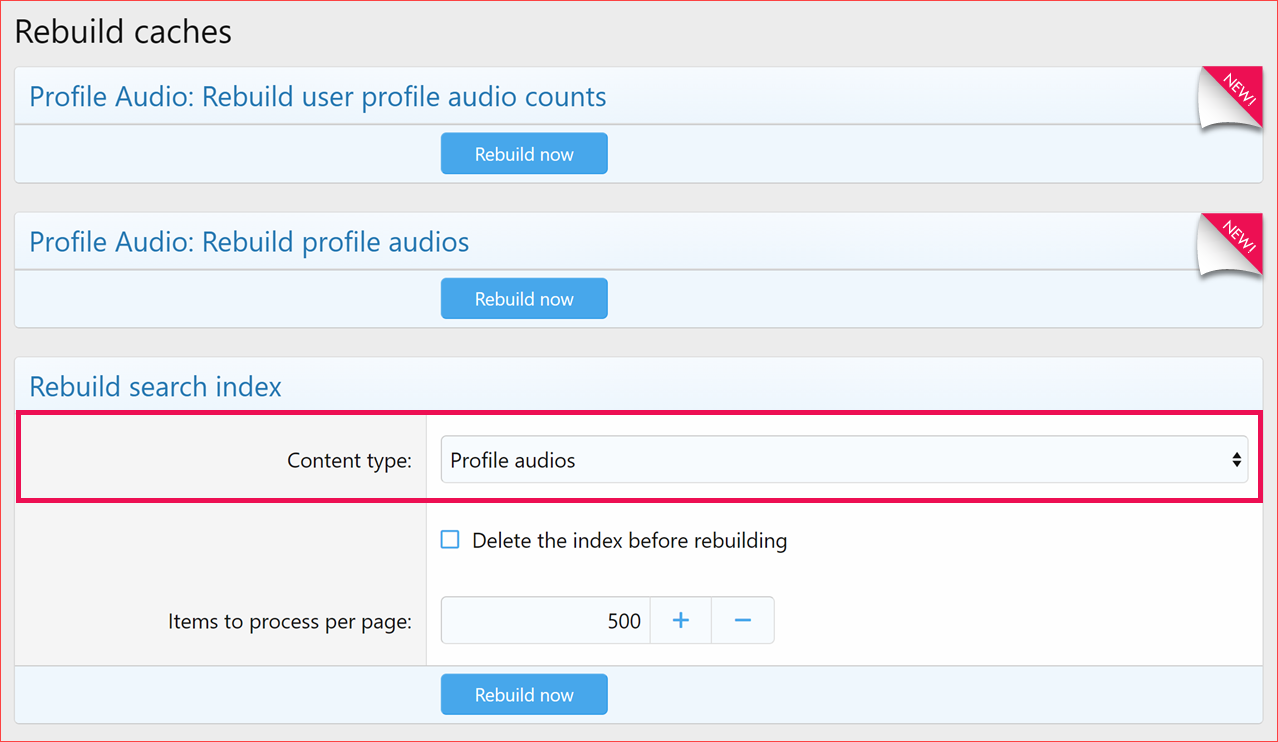
Rebuild Caches
- Profile Audio: Rebuild profile audios.
- Profile Audio: Rebuild user profile audio counts.
- Rebuild search index > Content type > Profile audios.
 Moderator log:
- Profile audio title change.
- Profile audio removal from public view with reason.
- Profile audio permanently deletion.
- Profile audio reassignment.
Upgrade to Profile Audio Player v2.0.0 today!
We've sent an  email to all our existing customers, providing details of available payment options to upgrade to v2.
Upgrade Notes
- When upgrading, please ensure that you're upgrading from v1.0.3.
- Also make sure that you CHECK the "Overwrite existing files for add-on rebuilds / upgrades" option.
- If you have made modifications to the templates, be sure to make a backup of those changes.


