

Events Manager version 1.2.6 is now available for all licensed customers to download. In this update, we've implemented several new features and enhancements. Additionally, we've addressed a bug that was reported through our support ticket system.
Note: Events Manager v1.2.6 is not compatible with XF 2.3.0 Beta. We're working on a compatible version; stay tuned for updates.
 New Features and Enhancements
- Added support for private event permission
View private eventat the category level. (Suggested by @Michael) - Users will now see a permission error if trying to access a private event without the
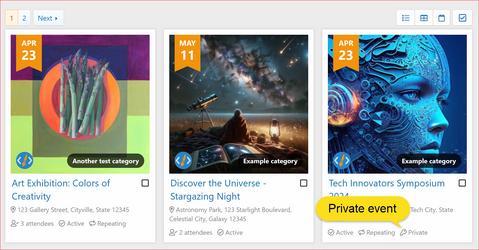
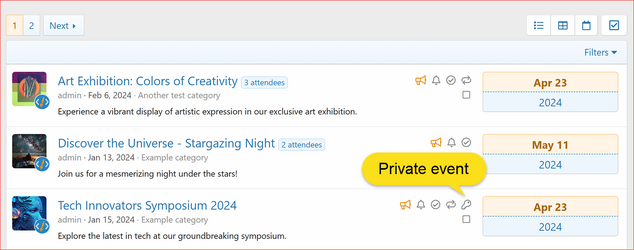
View private eventpermission. (Suggestion) - Private events are now clearly indicated on event listing (list & grid display mode). (Suggestion)
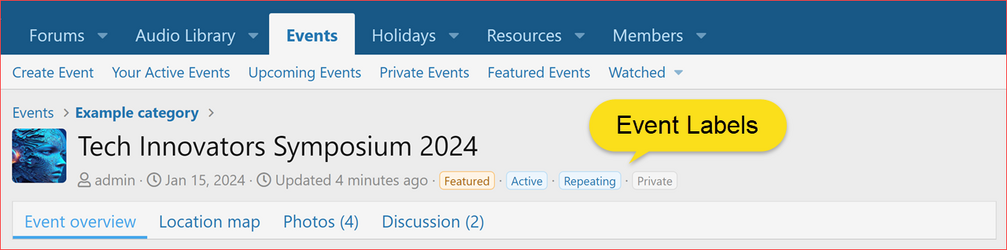
- Added labels on the Event view page to indicate event status: (Suggestion)
- Active Event: Displayed with a
Activelabel. - Repeating Event: Indicated by a
Repeatinglabel. - Private Event: Shown with a
Privatelabel.- Added a new phrase
xcu_em_private
- Added a new phrase
- Active Event: Displayed with a
- Enhanced event photos tab to show the photo count beside the tab label for quick visibility of associated photos. (Suggested by @Morrus)
- Enhanced discussion tab to display reply count alongside the label, showing only when replies exist for increased engagement awareness. (Suggested by @Morrus)
- Added options to display or hide blocks in the side navigation. (Suggested by @Jimmi)
- Display Categories In Side Navigation.
- Display Filter Events In Side Navigation.
- Display Upcoming Events In Side Navigation.
 Changes
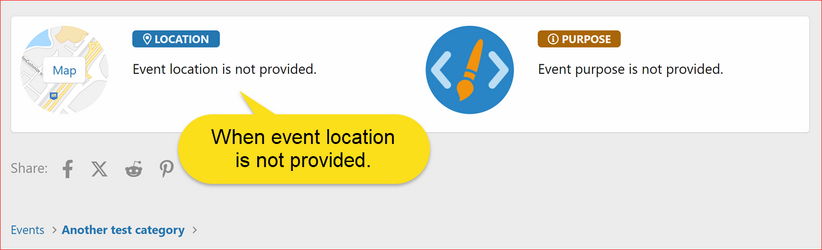
- Modified the event location display logic to show a standardized message when the event location is not specified.
- Added a new phrase
xcu_em_event_location_is_not_provided.
- Added a new phrase
 Bug Fixes
- Fixed a bug that caused an error when previewing event text due to a call to an undefined method. (Reported by @dunowat)
 Upgrade Notes
- When upgrading please ensure that you
 the "Overwrite existing files for add-on rebuilds / upgrades" option.
 - If uploading files using an FTP or file manager, you have to overwrite all files.
- After upgrading, please make sure to revert the following modified templates to ensure the changes take effect.
core_xcu_event.lessxcu_event_category_list_macrosxcu_event_list_macrosxcu_event_overviewxcu_event_view_macrosxcu_event_view_wrapper_macros
 XF 2.3 Compatibility
Note: Events Manager v1.2.6 is not compatible with XF 2.3.0 Beta. We're working on a compatible version; stay tuned for updates.
Attachments
-
 XenCustomize-Events-Manager-v126-Event-Labels.png132.4 KB · Views: 807
 -
 XenCustomize-Events-Manager-v126-Event-View-Location-Not-Provided.png89.8 KB · Views: 747
 -
 XenCustomize-Events-Manager-v126-Event-View-Photos-Count-Discussion-Replies-Count.png77 KB · Views: 752
 -
 XenCustomize-Events-Manager-v126-Grid-Display-Mode-Private-Event.png796 KB · Views: 754
 -
 XenCustomize-Events-Manager-v126-List-Display-Mode-Private-Event.png205.9 KB · Views: 777
 -
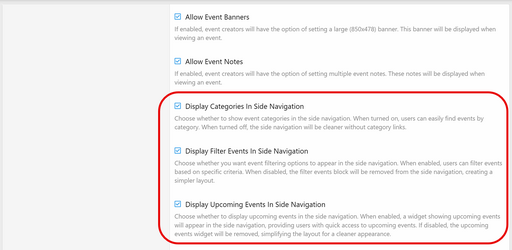 XenCustomize-Events-Manager-v126-New-Admin-Options.png182.7 KB · Views: 748


