

A new update is available for Online Time Tracker by XenCustomize.
This update adds a new member privacy option (suggested by @Recep Baltaş) for online time visibility, improves the Online Time Statistics page with native clickable member profile links, and introduces support for XenCustomize Core Library and the XenCustomize license system.
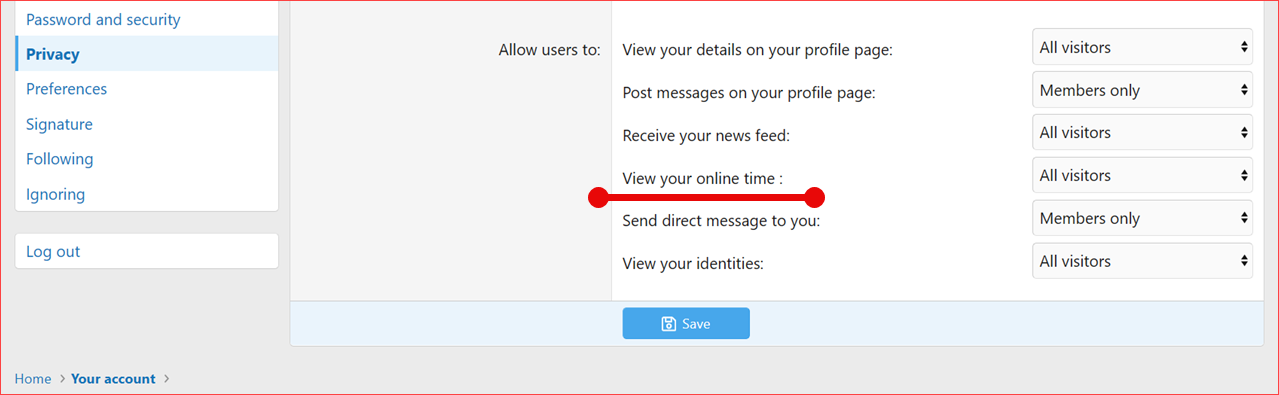
Members can now choose who may view their individual online time from their account privacy settings. This gives users more control while keeping the existing admin permissions fully intact.
If upgrading from XenCustomize Time Spent Online 2.1.3, please follow the upgrade guide provided with XenCustomize Online Time Tracker 2.2.0.
Full Changelog:
Download the latest version or purchase here!
 XenCustomize Online Time Tracker 2.2.3 Released!
This update adds a new member privacy option (suggested by @Recep Baltaş) for online time visibility, improves the Online Time Statistics page with native clickable member profile links, and introduces support for XenCustomize Core Library and the XenCustomize license system.Members can now choose who may view their individual online time from their account privacy settings. This gives users more control while keeping the existing admin permissions fully intact.
If upgrading from XenCustomize Time Spent Online 2.1.3, please follow the upgrade guide provided with XenCustomize Online Time Tracker 2.2.0.
Full Changelog:
 New Features
- Added a new account privacy option: View your online time.
- Members can choose who can view their individual online time using XenForo's standard privacy choices: all visitors, members only, people they follow, or nobody.
- The new privacy setting applies to personal online time displays in member profiles, member tooltips, and message user info.
- Integrated support for XenCustomize Core Library and the XenCustomize license system.
 Improvements
- Made usernames on the Online Time Statistics page clickable using native XenForo member profile links.
- The Most Engaged User Today card and usernames in the summary text now link to the related member profiles.
- The existing styling of the statistics page has been preserved.
 Upgrade Notes
- Existing users default to Everyone for the new online time privacy option, preserving the previous visibility behavior unless members choose to change it.
- The existing user group permissions remain available:
- Can view own online time
- Can view online time of others
- Can view online time statistics
- All addon files must be overwritten during the upgrade.
- XenCustomize Core Library is required for this version.
Download the latest version or purchase here!


