
XenCustomize Media Gallery Visitors 2.0.1
- Seller XenCustomize
- Creation date
Track and display media gallery visitors to users and moderators based on separate permissions.
-
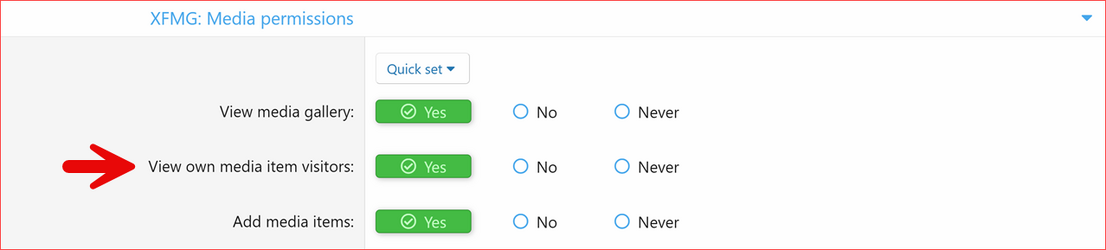 Media-Gallery-Visitors-1.0.0-User-Group-Permission-1.png
 -
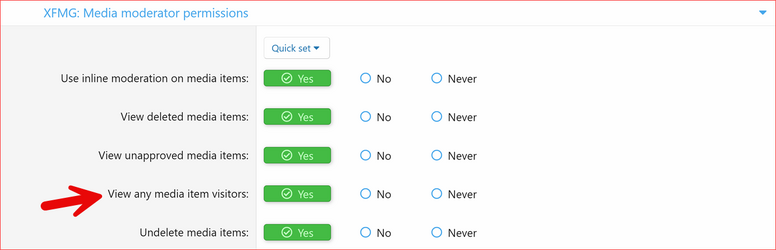 Media-Gallery-Visitors-1.0.0-User-Group-Permission-2.png
 -
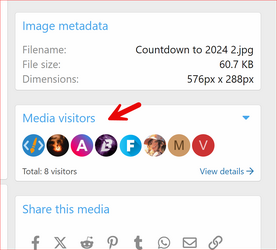 Media-Gallery-Visitors-1.0.0-Media-Visitors.png
 -
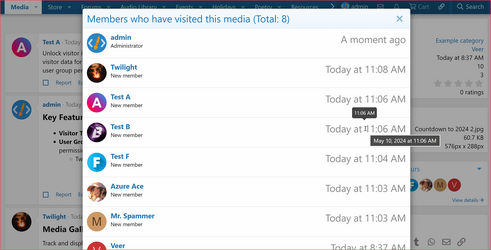 Media-Gallery-Visitors-1.0.0-Members-Who-Visited-This-Media.png
 -
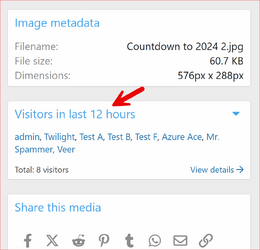 Media-Gallery-Visitors-1.0.0-Visitors-Last-X-Hours.png
 -
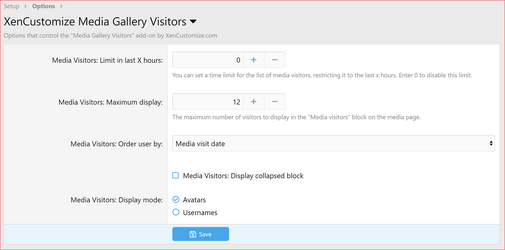 Media-Gallery-Visitors-v200-Admin-Options.png
Overview Releases (3)
XenCustomize Media Gallery Visitors add-on for XenForo 2!
Unlock visitor insights for each media item with XenCustomize Media Gallery Visitors. This add-on tracks and displays recent visitor data for media items — both in the standard media view and in the lightbox view. Easily manage access and visibility with flexible user group permissions. Key Features
 Visitor Tracking
Track and display recent visitor activity for each media item, helping you analyze engagement and user interest.
 Supports Lightbox & Media View
Displays the “Media Visitors” block on both the regular media detail page and the lightbox overlay view for consistent visibility.
 User Group Permissions
Control who can view media visitor data with simple yet powerful permission settings.
 Flexible Permissions
- View own media item visitors – Let users see who viewed their own media.
- View any media item visitors – Allow moderators or selected user groups to view visitor info for all media.
 Comprehensive Admin Options
Customize the behavior and appearance of the visitors block:
- Media Visitors: Limit in last X hours – Restrict the visitor list to a set time frame (enter 0 to disable).
- Media Visitors: Maximum display – Define the maximum number of visitors shown in the "Media Visitors" block.
- Media Visitors: Order user by – Choose how visitors are sorted:
- Media visit date
- Alphabetical
- Media Visitors: Display collapsed block – (Checkbox) Show the visitor block in a collapsed state by default.
- Media Visitors: Display mode– Choose how visitors appear:
- Avatar
- Username
 Requirements
- XenForo Media Gallery 2.2.0+
 Compatible with
- XenForo 2.2
- XenForo 2.3
- XenForo Media Gallery 2.2
- XenForo Media Gallery 2.3
- [cXF] Sidebar for Media 1.2.3
Boost engagement and take control of media insights with XenCustomize Media Gallery Visitors!


Supported Payment Methods
We support PayPal for instant purchases. Your order completes within minutes! For those without a PayPal account, you can pay using manual methods such as Western Union, Payoneer, and Bank Transfer.


Manual payments take more time. Please register an account, add products to your shopping cart, and start a private ticket with us for further instructions.
-
Really cool plugin with quick support!
Really cool plugin! Can show who viewed media items via avatar or username. Has a cut off for how long to record viewers, and how many max viewers are displayed, with several... Continue reading -
Great add on, perfect as an addition to a gallery
Great add on, perfect as an addition to a gallery. I think it helps to give visibility to our media and it's a really good thing to know visits. A (must have) for a gallery... Continue reading

Product Information
XenForo Media Gallery 2.2.0+
XenForo Media Gallery 2.3.0+